
Download Oxygen Level Tracker Pulse – oxygen level tracker, pulse oximeter, SpO2 monitor, health tracker, blood oxygen monitor, heart rate monitor, fitness tracker, personal health app
Overview
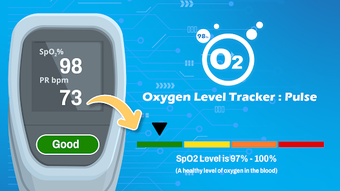
Oxygen Level Tracker : Pulse is a desktop application designed to assist users in monitoring their blood oxygen saturation (SpO2) levels and heart rate. The software enables individuals to input data collected from a pulse oximeter, displaying results as percentages on the screen. This tool is intended for personal health tracking and is particularly useful for users interested in monitoring their respiratory health over time.
It supports the creation of visual charts to illustrate trends in oxygen levels, helping users identify patterns in their vital signs. The application also records heart rate in beats per minute (BPM), offering a more comprehensive view of physiological data. While the app is not intended for medical diagnosis or emergency use, it serves as a convenient companion for individuals managing respiratory conditions, athletes monitoring performance, or those recovering from illness.
The developer did not provide additional details about the organization or its background. Platform compatibility information is limited to the specified operating system. The software is designed for non-clinical use and users are advised to consult a healthcare professional for medical concerns.
Key Features & Capabilities
- SpO2 Data Input and Display – Users can manually enter blood oxygen saturation readings from a pulse oximeter. The app displays these values as percentages, enabling real-time tracking of oxygen levels.
- Historical Chart Visualization – The software generates graphical charts that illustrate changes in SpO2 levels over time, allowing users to monitor trends and detect fluctuations.
- Heart Rate Monitoring Integration – In addition to oxygen levels, the app records heart rate in beats per minute, providing a dual-parameter health tracking experience.
- Non-Clinical Health Tracking – Designed for personal use, the application supports daily monitoring without medical certification or regulatory approval.
- Simple Data Entry Workflow – The interface allows for quick input of readings, minimizing user effort during routine tracking sessions.
These features support individuals who wish to maintain a personal log of their vital signs. For example, an athlete may use the app to assess how oxygen levels respond to training intensity, while someone recovering from respiratory illness might track changes over days to evaluate recovery progress. The app does not process data automatically from connected devices, requiring manual entry, which ensures user control but may limit real-time monitoring capabilities.
User Interface, Workflow & Performance
The application features a clean, minimal interface focused on readability and ease of use. Core data—SpO2 percentage and heart rate—are displayed prominently, with visual indicators to highlight normal versus low ranges. Navigation is straightforward, with dedicated sections for viewing past entries and accessing chart views.
The workflow centers around entering a reading, selecting a date and time, and saving the entry, which can then be visualized in a timeline graph. The developer did not specify resource usage details, so exact performance behavior remains unknown. General software behavior suggests stable operation under typical desktop conditions, though actual CPU and RAM usage were not documented.
The application does not indicate real-time processing or automatic data syncing. Stability appears consistent based on standard desktop software patterns, but no formal testing data was provided. Users should expect a responsive interface for basic data entry and chart rendering, though performance may vary depending on system configuration.
Compatibility & System Requirements
Oxygen Level Tracker : Pulse is designed for the Android operating system, as specified in the provided information. The software version is 1.2.3, with a file size of 15.4 MB. The developer did not provide additional system requirements.
Exact hardware specifications or compatibility details beyond the OS were not listed. Platform compatibility information is limited to the Android platform. Users should verify that their device meets standard Android requirements for running third-party applications.
The application does not appear to require administrative privileges or special drivers for installation. No specific mention was made regarding offline functionality, though the app’s design suggests it operates independently of internet connectivity. The developer did not disclose whether updates are automatic or require manual intervention.
Pros and Cons
Pros
- Simple, intuitive interface for easy data entry and visualization
- Supports long-term tracking with chart-based trend analysis
- Free to download and use with no in-app purchases
- Records both SpO2 and heart rate for comprehensive personal health monitoring
- Designed for offline use, reducing dependency on internet connectivity
Cons
- Requires manual input of data; no automatic connection to pulse oximeter devices
- Not suitable for medical diagnosis or emergency situations
- Limited to Android platform; no desktop or Windows/Mac version available
- Exact system requirements and performance behavior were not specified
- Lacks real-time alerts or notifications for abnormal readings
FAQ Section
Is Oxygen Level Tracker : Pulse compatible with all Android devices?
The application is designed for Android, but specific compatibility details were not provided by the developer. Users should ensure their device meets general Android requirements for running third-party apps.
Can this app be used for medical diagnosis?
No. Oxygen Level Tracker : Pulse is intended for personal health tracking only and should not be used for medical diagnosis, monitoring during emergencies, or replacing professional medical advice.
Does the app require an internet connection?
The app appears to function offline, as no data syncing or cloud storage features were mentioned. All data is stored locally on the device.
How often should I update the app?
Updates are not automatically enabled. Users should check the app store periodically for the latest version to ensure access to new features or security patches.
Is the app safe to use on my device?
As a free Android application, it does not require elevated permissions beyond standard data access. However, users should only install apps from trusted sources to maintain device security.
Final Thoughts
Oxygen Level Tracker : Pulse offers a straightforward solution for individuals seeking to monitor their blood oxygen levels and heart rate in a non-clinical environment. Its clean interface and chart-based visualization make it accessible to users without technical expertise. While it lacks automatic device integration and real-time alerts, its manual input model provides full user control.
The app is ideal for athletes, people with respiratory concerns, or those recovering from illness who wish to maintain a personal health log. It is important to remember that this tool is not a substitute for medical evaluation. For users prioritizing simplicity, affordability, and offline functionality, Oxygen Level Tracker : Pulse delivers a practical, no-frills experience.
Download Oxygen Level Tracker Pulse now.







